
ABBYY BCR - DISCONTINUED9.0.2.1 - Get APK
You'll be able to download in few seconds.
Publisher Description
IMPORTANT! Business Card Reader for Android has been discontinued and will only be available until September 18, 2023
**************
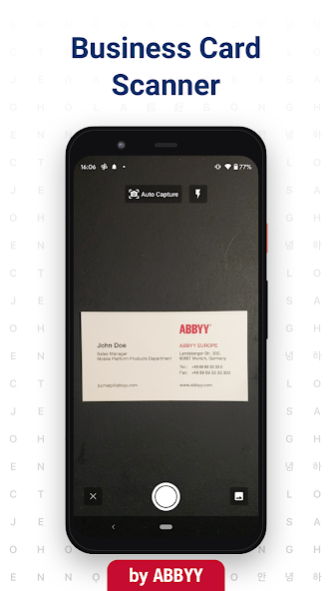
ABBYY Business Card Scanner is a scanner app that can manage all your contacts in a digital library.📱
Our Business Card Reader (BCR) allows you to:
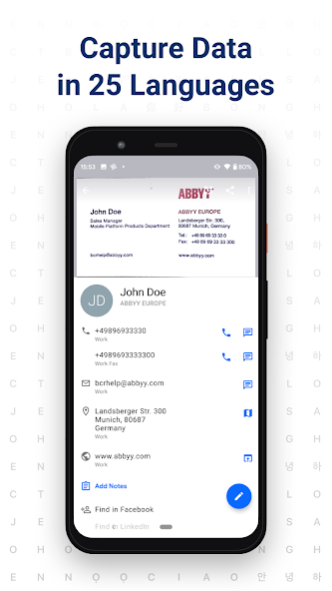
- Instantly transfer data in 25 languages right onto your smartphone
- Sync data across smartphones, tablets, and computers via ABBYY’s cloud and access your contacts from anywhere on ABBYYBCR.COM
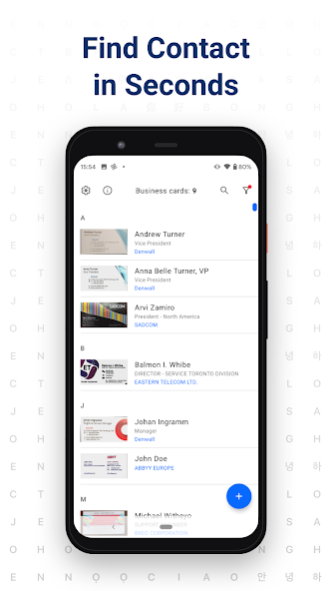
- Save contacts in your own electronic storage – CardHolder – with a simple search, sorting, and grouping capabilities
- Share biz contacts data by e-mail or SMS and export to Excel
🏆 Recommended by The New York Times, CNN, The Telegraph, Computer Business Review, Macworld.
🏆 ‘If your desk is strewn with printed business cards this could be the app for you. Throw away your 1980s-style Rolodex and download the ABBYY Business Card Reader (BCR)’ - The Telegraph (UK).
🏆 Mobile Star Award Winner of SHINING STAR in the "Contact Manager App" category.
🏆 ABBYY BCR is a Featured App in the Intel® Business App Portfolio.
FEATURES
✔️ No need to enter contact details into your mobile phone manually. Instead, scan them with your phone. Our app uses smart OCR technology. Forget having to correct the details. Use our digital business card reader for quick and easy name-keeping.
✔️ Create a virtual database. Access it from your computer, smartphone, or tablet.
✔️ Are you using a Salesforce CRM? Export your contacts after scanning them and share them with people.
✔️ Want to say hello to an old friend but can’t find the contact? It’s easy to search through our business card organizer and find the phone number or email you’re looking for.
✔️ Keep notes about contacts in your smart card keeper. Notes are easy to make, edit, and look through.
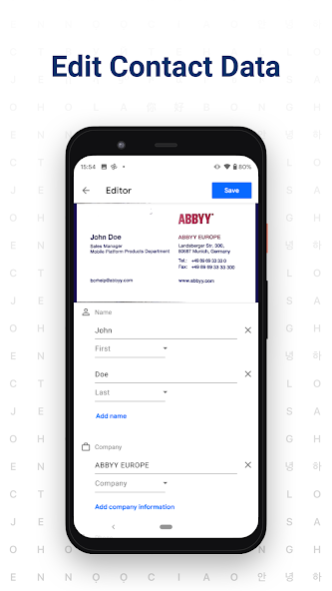
✔️ Make sure the card reader app made no mistake instantly. The BCS will highlight uncertain characters and show the original image so that you can compare the two.
✔️ Share contact via SMS as plain text or email as a JPEG file.
✔️Export the whole database to MS Excel.
✔️ Is someone from your contact list visiting you soon? Scroll through popular social networks to find out more about them.
S25 languages available. You can perform a card scan on a multilingual one too!
• Czech
• Chinese (Simplified)
• Chinese (Traditional)
• Danish
• Dutch
• English
• Estonian
• Finnish
• French
• German
• Greek
• Japanese
• Indonesian
• Italian
• Korean
• Norwegian (Bokmal)
• Norwegian (Nynorsk)
• Polish
• Portuguese (Portugal)
• Portuguese (Brazil)
• Russian
• Spanish
• Swedish
• Turkish
• Ukrainian
Create a business card holder in your phone using just your camera and ABBYY Business Card Scanner.
--------------
FOLLOW US
abbyy.com/blog/mobile
Facebook.com/ABBYYsoft
Twitter @ABBYY_Software
YouTube.com/ABBYYvideos
--------------
Upgrade to the premium version of our scanner app to process an unlimited amount of business cards. Our app uses OCR scanning technology.
About ABBYY BCR - DISCONTINUED
The company that develops ABBYY BCR - DISCONTINUED is ABBYY USA Software House Inc. The latest version released by its developer is 9.0.2.1.
To install ABBYY BCR - DISCONTINUED on your Android device, just click the green Continue To App button above to start the installation process. The app is listed on our website since 2022-08-16 and was downloaded 0 times. We have already checked if the download link is safe, however for your own protection we recommend that you scan the downloaded app with your antivirus. Your antivirus may detect the ABBYY BCR - DISCONTINUED as malware as malware if the download link to com.abbyy.mobile.bcr.lite is broken.
How to install ABBYY BCR - DISCONTINUED on your Android device:
- Click on the Continue To App button on our website. This will redirect you to Google Play.
- Once the ABBYY BCR - DISCONTINUED is shown in the Google Play listing of your Android device, you can start its download and installation. Tap on the Install button located below the search bar and to the right of the app icon.
- A pop-up window with the permissions required by ABBYY BCR - DISCONTINUED will be shown. Click on Accept to continue the process.
- ABBYY BCR - DISCONTINUED will be downloaded onto your device, displaying a progress. Once the download completes, the installation will start and you'll get a notification after the installation is finished.
Program Details
System requirements
Download information
Pricing
Version History
version 9.0.2.1
posted on 2022-08-16
+ Improved stability and bugfix
Check out our blog to learn more: abbyy.com/blog/mobile/
Rate the app on Google Play. Contact us if you have any suggestions: mobile_support@abbyy.com
version 9.0.0.7
posted on 2022-01-20
Meet the enhanced BCR:
+ New design and animations
+ Sorting and groups moved to a separate screen
+ Sharing contacts using a QR-code
+ Importing contacts and photos from a system Share menu
+ Dark Mode
+ Export to Salesforce is back
+ Improved stability and bugfix
+ and more.
Check out our blog to learn more: abbyy.com/blog/mobile/
Rate the app on Google Play. Contact us if you have any suggestions: mobile_support@abbyy.com
version 4.25.3.7
posted on 2022-01-20
+ Export to Salesforce CRM is no longer available.
The most important in previous versions:
+ Increased accuracy of recognition and business card auto cropping.
+ Increased security and stability of business cards synchronization.
version 4.25.2.5
posted on 2020-08-27
+ Increased security and stability of business cards synchronization.
The most important in previous versions:
+ Increased accuracy of recognition and business card auto cropping.
version 4.21.1.1
posted on 2019-03-16
We have changed app icon to celebrate 10 years anniversary of our apps!
Business Card Reader, TextGrabber and FineScanner are now indispensable digitizing assets for over 10 million people across the globe. Join our celebration and stay tuned! More cool features are coming soon!
If you like the app peasу leave a review in Google Play. Thank you!
version 4.7.638
posted on 2017-11-22
• For devices running Android 7.1 and above added App Shortcuts – now a long tap on the application icon starts business card capture or group editing.
• WEB ACCESS: work with business cards on your computer!
• We’ve also made the application more stable and faster.
Please leave a review if you like BCR. Thank you!
version 4.6.3
posted on 2016-12-09
+ SYNCHRONIZATION feature is now available to all BCR users. Enable it in Settings, and all cards will be available on your Android or iOS devices.,+ FOCUS on the business card: tap the screen where you want the focus to be – it helps get the perfect shot.,+ EXPORT OF BUSINESS CARDS to Contacts with enabled MS Exchange account.,+ QR-CODE READER: read QR-codes on business cards and save the information in the Notes or in the Contacts.,Please leave a review if you like ABBYY BCR. Thank you!
version 1.0.78.5
posted on 2011-03-14
Several fixes and updates
Disclaimer
External Download
We do not host ABBYY BCR - DISCONTINUED on our servers. We did not scan it for viruses, adware, spyware or other type of malware. This app is hosted by Galad and passed their terms and conditions to be listed there. We recommend caution when installing it.
The APK Download link for ABBYY BCR - DISCONTINUED is provided to you by apps112.com without any warranties, representations or guarantees of any kind, so access it at your own risk.
If you have questions regarding this particular app contact the publisher directly. For questions about the functionalities of apps112.com contact us.
